

Gmail deliverability means where your message lands inside Gmail—the Primary inbox, the Promotions tab, or Spam—not just whether it was “delivered.” For most senders, Gmail is the #1 mailbox provider because it consistently represents 30%+ of typical email lists, and its filtering decisions often predict how other providers will treat your mail.
If Gmail is sending you to spam, it’s almost always because your domain’s reputation and recent engagement signals (opens, clicks, replies, deletes-without-reading, “Mark as spam”) indicate low trust. Gmail is reputation-first and engagement-driven: it learns from how real recipients interact with your mail over time, and it weights domain reputation more than IP reputation for long-term outcomes.
The Promotions tab isn’t spam—it’s a classification. Promotions generally means Gmail believes your message is marketing-oriented (templates, links, images, tracking, promotional language, bulk patterns). Visibility can be lower than Primary, but placement in Promotions can still perform well when engagement is strong.
For senders who send 5,000+ messages/day, Gmail’s 2024 bulk sender requirements include:
- SPF, DKIM, and DMARC authentication
- One-click unsubscribe support (per RFC 8058) and easy opt-out
- Keeping spam rates low in Google’s measurement systems
On complaints, Gmail expects a spam complaint rate under 0.3%, and best practice is to target under 0.1% to protect inbox placement.
Set your strategy around the asset Gmail actually rewards: your domain reputation. It compounds slowly, breaks quickly, and is the foundation for consistently reaching the Gmail inbox.
How Gmail’s spam filtering actually works (reputation-first + engagement signals)
Gmail doesn’t run a single “spam test.” It uses layered filtering that combines technical validation, sender reputation, and user behavior to decide Inbox vs. Promotions vs. Spam (and sometimes throttling/deferrals).
Gmail’s layered filtering (from first gate to final placement)
Authentication & identity alignment
- Checks SPF, DKIM, and DMARC and whether they align with the visible From domain (a core part of Gmail’s sender guidelines).
- Misalignment (e.g., DKIM signing a different domain than the From) increases risk even if “something passes.”
Reputation scoring (the primary driver)
- Gmail assigns reputation to multiple entities: From domain, DKIM signing domain, sending IP, and sometimes subdomains.
- This reputation is updated continuously based on complaint rates, bounces, and engagement patterns.
Content + URL + behavioral heuristics
- Not just “spammy words.” Gmail evaluates link reputation, redirect chains, URL shorteners, attachment types, and template patterns seen in abuse.
User-level personalization
- Gmail learns per-recipient preferences: who they read, ignore, delete, or mark as spam. Two subscribers can receive the same campaign and see different placement.
Final placement decision
- Gmail chooses Primary/Promotions/Updates/Spam, or applies rate limiting when trust is low.
Reputation inputs: why domain reputation beats IP reputation
For most modern senders, domain reputation matters more than IP reputation because Gmail wants a stable identity that persists across infrastructure changes.
- A shared IP or ESP can’t “wash” a bad domain. If your From domain has a history of low engagement or complaints, moving IPs rarely fixes placement.
- Conversely, a strong domain can often tolerate minor IP fluctuations—especially when authentication is aligned and engagement is consistent.
- This is why warm-up and remediation should focus on improving domain-level signals, not just rotating IPs.
Engagement signals Gmail can infer (and what actually moves the needle)
Gmail doesn’t rely on “opens” the way marketers do (image loads are noisy). Stronger signals include:
Positive signals
- Replies (especially non-template replies)
- “Not spam” actions
- Moving a message to the inbox / dragging to Primary
- Starring, saving, or forwarding
- Adding the sender to contacts
Negative signals
- Spam complaints (Gmail’s key suppression trigger)
- Deletes without reading / rapid archiving
- Low read time, low repeat opens, and long-term ignoring
InboxAlly generates real Gmail engagement via seed emails, reinforcing the signals Gmail trusts most (see How Does InboxAlly Work).
Common root causes of spam placement (mapped to Gmail’s model)
- Misaligned acquisition → low engagement + higher complaints → domain reputation drops.
- Sudden volume spikes → reputation can’t “keep up” → throttling or spam placement.
- Low-engagement cohorts (old, unresponsive segments) → negative engagement signals dominate.
- Poor authentication alignment → identity uncertainty → higher filtering sensitivity (review Gmail and Yahoo changes for bulk senders in 2024).
- Complaint-driven suppression → once spam rate rises, Gmail reduces inboxing broadly; monitor in Postmaster Tools (see Integrate Google Postmaster Tools with InboxAlly).
Gmail’s 2024 bulk sender requirements (5,000+ messages/day): what to implement and how to verify
Provider Email Authentication Requirements
This comparison shows the bulk sender authentication requirements for Gmail, Microsoft Outlook, and Yahoo Mail — the three providers that collectively handle the majority of consumer and business email.
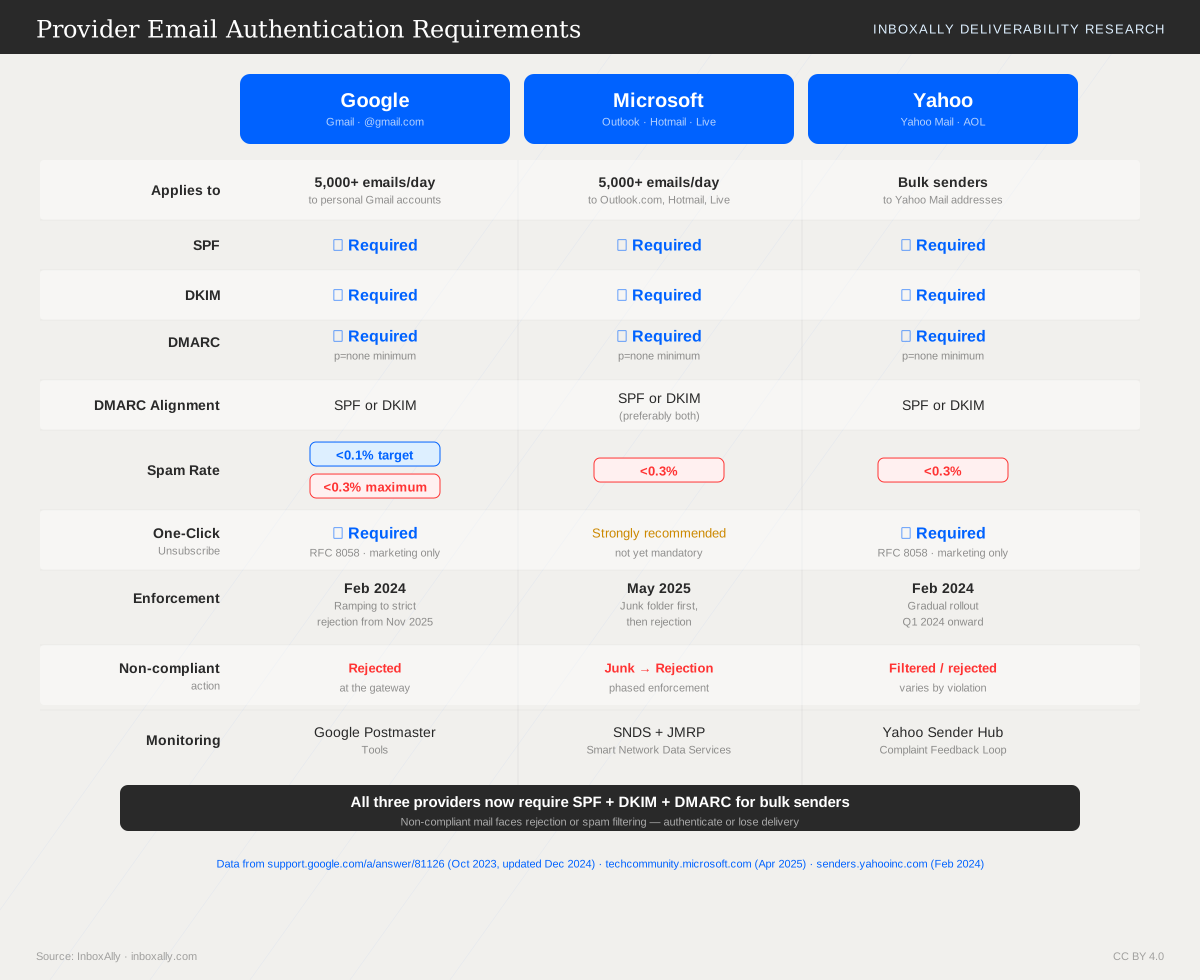
If you send 5,000+ messages/day to Gmail, Google treats you as a bulk sender and expects the following controls to pass consistently.
Mandatory requirements (and what “pass” means)
- SPF authentication + alignment
- Pass in practice: Gmail can validate SPF for the sending infrastructure and the authenticated domain aligns with the visible From: domain (organizational domain match).
- DKIM authentication + alignment
- Pass in practice: DKIM signature verifies and the DKIM d= domain aligns with the visible From: domain (organizational domain match). Misalignment (e.g., From:
brand.combut DKIM d=vendor-mail.com) fails alignment even if DKIM “passes.”
- Pass in practice: DKIM signature verifies and the DKIM d= domain aligns with the visible From: domain (organizational domain match). Misalignment (e.g., From:
- DMARC published + alignment
- Pass in practice: A DMARC record exists at
_dmarc.yourdomain.com, and either SPF or DKIM is aligned (DMARC “pass”). Gmail expects DMARC for bulk senders even if you start with a monitoring policy.
- Pass in practice: A DMARC record exists at
- TLS encryption
- Pass in practice: Messages are delivered over TLS (encrypted in transit). In Google Postmaster Tools, Encryption should show near-100% for outbound mail.
- One-click unsubscribe (RFC 8058)
- Pass in practice: Marketing mail includes a working List-Unsubscribe header with a one-click method (typically
List-Unsubscribe-Post: List-Unsubscribe=One-Click) and the request succeeds without requiring login.
- Pass in practice: Marketing mail includes a working List-Unsubscribe header with a one-click method (typically
Gmail spam complaint thresholds (why <0.1% is the real target)
Google’s published threshold is < 0.3% spam complaint rate. Treat that as a hard ceiling, not an operating target. Aim for < 0.1% because:
- Complaint rate is complaints ÷ delivered volume. On small sends, a few complaints create big swings (e.g., 3 complaints on 1,000 delivered = 0.3%).
- Gmail reacts to spikes, not averages. A single campaign to a cold segment can push you over the line and depress domain reputation for days.
- Complaint rate is correlated with other negative signals (low engagement, high deletes-without-open), which can increase spam placement even before you hit 0.3%.
Implementation checklist (what to configure and how to verify)
- DNS authentication
- Publish SPF for your sending sources (avoid multiple SPF records).
- Enable DKIM and confirm the selector records resolve.
- Publish DMARC at
_dmarcwith reporting addresses.
- Verify alignment
- Ensure From: uses your branded domain.
- Ensure DKIM d= matches the same organizational domain as From.
- Ensure SPF “Mail From/Return-Path” aligns where possible.
- DMARC policy progression
- Start with
p=none(monitor) → move top=quarantine→ thenp=rejectonce legitimate sources are aligned and stable.
- Start with
- Unsubscribe UX
- Add header-based one-click unsubscribe (RFC 8058).
- Provide a fast landing page confirming the opt-out (no login, minimal steps), and honor requests promptly.
Resources to execute (InboxAlly + internal guides)
- Follow Gmail and Yahoo Changes for Bulk Senders in 2024 for the full requirement breakdown and rollout notes.
- Implement one-click correctly using RFC 8058 Compliance.
- Monitor ongoing pass/fail status and alignment using InboxAlly Domain Reports (authentication visibility across SPF/DKIM/DMARC and trend monitoring).
Primary vs Promotions vs Spam: how the Promotions tab works and whether you should fight it
Promotions isn’t spam (but it is different)
Gmail’s Promotions tab is a categorization choice, not a penalty. Messages in Promotions are typically:
- Less visible by default: users often open Gmail to the Primary tab first, and may only scan Promotions in batches.
- Handled differently by notifications: many users have notifications tuned for Primary (or “important”) messages, while Promotions may be silent.
- Consumed with a different mindset: Promotions is where people expect newsletters, product updates, and offers—so opens can be lower, but intent can be higher when they do engage.
It’s acceptable (and often ideal) for newsletters, announcements, and discounts to land in Promotions—especially if conversions are strong and spam complaints stay low.
What drives Gmail’s tab placement
Gmail uses a mix of message-level, sender-level, and user-level signals. Common drivers include:
- Message structure: heavy HTML templates, multiple images, hero banners, buttons/CTAs, and “marketing-style” layouts.
- Commercial intent cues: pricing language, urgency (“limited time”), coupon codes, and repeated calls to buy.
- Link patterns: many links, tracking parameters, shorteners/redirect chains, or inconsistent domains between links and From domain.
- Sending domain history: consistent positive engagement improves trust; inconsistent volume or poor engagement can push mail away from Primary.
- User interactions: opens, replies, moving messages between tabs, starring, and “Not spam” actions are strong personalization signals.
Practical levers (without “gaming” Gmail)
To influence placement ethically, focus on alignment and engagement:
- Segment by intent: send lifecycle/relationship emails to engaged users; keep broad promos separate.
- Write more conversational copy: fewer graphics, fewer CTAs, more plain-text structure when appropriate.
- Reduce promotional cues: limit banners, excessive links, and sales-heavy subject lines for messages that should feel personal.
- Be consistent: stable From name, sending domain, and cadence help Gmail learn what you are.
- Encourage real engagement: ask for replies, and prompt subscribers to save your address/contact.
InboxAlly helps by generating real Gmail engagement signals (opens, replies, inbox placement behaviors) via seed emails—supporting stronger Gmail domain reputation over time. See How Does InboxAlly Work and Integrate Google Postmaster Tools with InboxAlly.
“How do I get out of Promotions?” A decision framework
Optimize for Primary when the email is:
- High-value lifecycle/transactional (onboarding steps, account/security, receipts, critical updates)
- Time-sensitive and personal (1:1-style check-ins, support follow-ups)
- Measured on reply rate, task completion, retention
Embrace Promotions when the email is:
- A newsletter, content round-up, or offer
- Measured on revenue per send, conversions, and long-term engagement
- Still meeting Gmail’s sender guidelines (low complaints, strong authentication)
Measure outcomes by tab: track complaints, replies, conversions, and Postmaster reputation trends, not just “Primary vs Promotions.”
Google Postmaster Tools: the Gmail metrics that matter (and how to act on them)
Google Postmaster Tools (GPT) is Gmail’s “health dashboard” for bulk senders. It won’t explain every inbox vs. Promotions decision, but it will show whether Gmail trusts your domain, your IPs, and your mailing practices.
Setup prerequisites (and how to read the data)
To see meaningful metrics, you need:
- Domain verification: Add the DNS TXT record for the exact sending domain (or subdomain) you use in the From/Return-Path alignment.
- Sufficient volume: GPT only populates when Gmail sees enough traffic from your domain/IPs. Low volume can mean missing days or “no data.”
- Trend-first interpretation: Treat GPT as a 7–30 day trend tool, not a single-day scoreboard. One bad day can be noise; sustained movement usually reflects a real change in list quality, content, or sending patterns.
Key metrics (what “good” looks like)
- Domain Reputation: Gmail’s trust in your domain (most important).
Good: High/Medium and stable. Risk: sustained drop to Low/Bad. - IP Reputation: Trust in the sending IP.
Good: High/Medium. Risk: Low/Bad, especially after IP changes or new infrastructure. - Spam Rate: % of mail marked spam by users (per Gmail).
Good: consistently <0.1%; must stay <0.3% to meet Gmail bulk sender expectations. - Authentication (pass rates): SPF, DKIM, and DMARC alignment/pass.
Good: near-100% pass for the stream you’re measuring; dips indicate misalignment, forwarding issues, or config drift. - Encryption: TLS usage between servers.
Good: ~100%. Lower values can signal delivery path issues or outdated sending infrastructure.
Turn metrics into actions (and isolate the culprit)
Domain reputation drops
- Pause/slow the riskiest sends (cold segments, broad promos).
- Tighten targeting and remove unengaged recipients.
- Use InboxAlly to rebuild positive Gmail engagement signals; validate improvement against GPT trends.
Spam rate rises
- Identify the campaign/segment spike (often acquisition or reactivation).
- Add clearer expectations, reduce frequency, and ensure one-click unsubscribe (see RFC 8058 Compliance).
- If you use Gmail’s complaint data, pair it with Gmail Complaint Feedback Loop Setup.
Authentication dips
- Re-check SPF/DKIM/DMARC alignment for each sending domain/subdomain.
- Confirm recent ESP/infrastructure changes didn’t introduce a new, unauthenticated stream.
Isolate marketing vs. lifecycle
- Separate by subdomain (e.g., marketing.example.com vs. notify.example.com) and/or dedicated IP pools so GPT trends map to a single stream.
To connect GPT signals directly to InboxAlly outcomes, follow Integrate Google Postmaster Tools with InboxAlly and compare reputation/spam-rate trends with InboxAlly reporting.
Gmail Complaint Feedback Loop (FBL): what it is, how to register, and how to use the data
Gmail’s Complaint Feedback Loop (FBL) reports individual user spam-complaint events (when a recipient hits Report spam) for mail you send to Gmail. This is different from Google Postmaster Tools “spam rate,” which is an aggregate rate calculated across eligible traffic and shown as a trend. FBL is event-level and actionable; Postmaster is directional and diagnostic.
Limitations (by design):
- Privacy constraints: complaint reports are minimized and may not include full recipient identity or message content.
- Coverage is not universal: not every message/recipient will generate a report, and reports can be delayed.
- Not a deliverability score: use it to drive suppression and root-cause analysis, not to “prove” inbox placement.
Registration + technical requirements (high level)
To receive FBL reports, you’ll need:
- Authenticated mail (SPF/DKIM aligned; DMARC recommended) and consistent sending domains.
- Correct headers so Gmail can map a complaint back to your stream (e.g., stable identifiers like campaign/message IDs).
- A processing endpoint (mailbox or webhook) to ingest reports and log them reliably.
Follow the step-by-step guide in Gmail Complaint Feedback Loop Setup for exact prerequisites and validation.
Operationalizing FBL data (what to do with it)
- Immediate suppression: on first complaint, add the address to a “do-not-email” list across all systems. No retries.
- Cohort analysis: group complaints by:
- acquisition source / lead magnet
- segment (new vs. long-term, engaged vs. cold)
- campaign + subject line + offer
- Adjust creative + frequency: reduce volume to high-complaint cohorts, tighten targeting, and rewrite misleading subject lines or overly aggressive CTAs.
Reducing complaints is essential for Gmail’s bulk sender requirements: keep complaint rate <0.3% and aim for <0.1%. Pair FBL suppression with engagement improvements using InboxAlly (see How Does InboxAlly Work and Integrate Google Postmaster Tools with InboxAlly).
Gmail-specific deliverability problems: greylisting, deferrals (421), and rate limiting
Greylisting in Gmail terms is a temporary “not now” response where Gmail defers acceptance of mail to test sender behavior. Deferred delivery is the broader category: Gmail returns a temporary 4xx SMTP code and expects your server/ESP to retry. New senders—or “changed” senders (new domain, new IP, new From: pattern, sudden list growth, content shifts)—often see deferrals because Gmail is building confidence. Proper retries should be automatic, spaced out, and persistent (minutes to hours), not rapid-fire.
Common SMTP symptoms (and what they usually mean)
You’ll typically see temporary failures such as:
421 4.7.0/421 4.7.28style deferrals- “Try again later,” “rate limited,” “throttled,” or “temporary system problem”
These usually indicate one (or more) of the following:
- Reputation uncertainty: Gmail isn’t sure how users will react yet.
- Volume spikes: Sending faster/higher than your recent baseline.
- Authentication inconsistencies: SPF/DKIM/DMARC alignment changes, rotating domains, or intermittent signing issues.
Troubleshooting checklist
- Stabilize volume: Hold daily Gmail volume steady for several days; avoid campaign “bursts.”
- Ramp slowly: Increase in small, predictable steps (especially after domain/IP/content changes).
- Improve list quality: Remove inactive/unknown addresses; prioritize recent engagers.
- Keep authentication consistent: Ensure SPF, DKIM, and DMARC alignment stays stable across all streams (see Integrate Google Postmaster Tools with InboxAlly and Gmail and Yahoo Changes for Bulk Senders in 2024).
- Coordinate ESP retry logic: Confirm your ESP honors 4xx retries with exponential backoff and does not convert deferrals into bounces.
Why Gmail does this
Deferrals and rate limits are Gmail “buying time” to observe engagement signals (opens, replies, deletes, spam complaints). InboxAlly helps accelerate positive reputation signals so Gmail stops throttling and you consistently reach the inbox.
Best practices to reach the Gmail inbox (and how warm-up impacts Gmail reputation)
Gmail deliverability is reputation-first: Gmail weighs domain reputation and user engagement heavily, then uses those signals to decide inbox vs. spam (and sometimes Primary vs. Promotions). Use this Gmail-focused playbook to earn consistent positive signals.
A Gmail-focused playbook
Strong authentication + alignment
- Publish SPF and sign with DKIM for every stream.
- Enforce DMARC with alignment (the visible “From” domain should align with SPF/DKIM domains). This supports Gmail’s bulk sender requirements and reduces spoofing risk.
- Keep sending domains stable; avoid frequent “From” domain changes that reset reputation.
List hygiene (protect reputation before you send)
- Remove hard bounces, role accounts, and chronically unengaged addresses.
- Verify new lists before importing to your ESP to prevent bounce spikes and spam complaints.
Segmentation by engagement
- Prioritize recent open/click/reply segments and suppress long-term inactive recipients.
- Re-introduce older segments slowly (and only after inbox placement stabilizes).
Consistent cadence
- Gmail dislikes erratic patterns. Keep volume and frequency predictable by day and by stream (newsletter vs. transactional vs. outreach).
Content that earns positive Gmail signals
- Write for actions Gmail can observe: replies, “Not spam”, move-to-inbox, and contact adds.
- Keep formatting clean (balanced text-to-link ratio, minimal tracking clutter) and make the unsubscribe experience frictionless.
Warm-up for Gmail: what matters most
Warm-up is how you teach Gmail that your domain generates wanted mail. Done wrong, it looks like a compromised sender.
Ramp volume gradually
- Increase daily Gmail volume in small steps; avoid doubling overnight.
- Maintain steady sending windows (time-of-day consistency helps).
Start with highest-intent recipients
- Begin with people most likely to engage (recent customers, active subscribers, warm leads). Early engagement is a major reputation accelerator.
Avoid sudden list imports
- Uploading a large, unverified list and blasting immediately is one of the fastest paths to spam placement and throttling.
Protect reputation during changes
- Treat a new domain, new ESP, or new sending stream as a fresh warm-up. Even if your brand is known, Gmail evaluates the new sending identity and patterns.
How InboxAlly helps Gmail reputation
InboxAlly includes Gmail seed emails that generate real engagement signals—opens, clicks, and move-to-inbox actions—helping train Gmail’s filters and strengthen domain reputation over time. Pair this with InboxAlly’s platform tools:
- Placement Tester to measure Gmail inbox vs. spam placement before scaling.
- Email Audit to catch authentication, content, and sending-pattern issues that suppress Gmail inboxing.
- IA Assistant — open it in the InboxAlly app for guided help with Gmail deliverability issues, authentication checks, and warm-up recommendations.
For the full mechanism, see How Does InboxAlly Work.
Action checklist + recommended tools
- Verify new or aging lists with InboxAlly Email List Verification.
- Build a Gmail-safe ramp using the Email Warmup Planner.
- Run Placement Tester + Email Audit, then iterate based on Gmail results.
- Start improving inbox placement today with a free InboxAlly trial.