

Email bounce management is the process of monitoring, classifying, and acting on “bounce back email” responses so you stop sending to addresses that can’t (or won’t) accept mail. It’s a deliverability must-have—not optional cleanup—because mailbox providers treat bounces as a direct signal of list quality. If you keep mailing bad addresses, your sender reputation drops, inbox placement suffers, and even careful warm-up efforts can stall or reverse.
Here’s what you need to know upfront. Hard bounces are permanent delivery failures (invalid address, non-existent domain) and should be removed immediately. Soft bounces are temporary failures (mailbox full, server busy, message too large) and usually warrant limited retries. Block bounces happen when a provider rejects you due to policy or reputation (often tied to spam complaints, authentication gaps, or blocklisting).
What’s “good”? Aim for an overall email bounce rate under 2%, with hard bounces under 0.5%. Higher rates are a red flag that you’re sending to stale, risky, or unverified contacts.
Should you remove soft bounces? Not instantly—but you should suppress after 2–3 consecutive soft bounces and investigate patterns. To reduce email bounces before you send, start with InboxAlly’s Email List Verification, then warm up using a clean list (see email warm-up timeline and Email Ramp Up Schedule).
Hard bounce vs soft bounce vs block bounce: what they mean (and how to read SMTP codes)
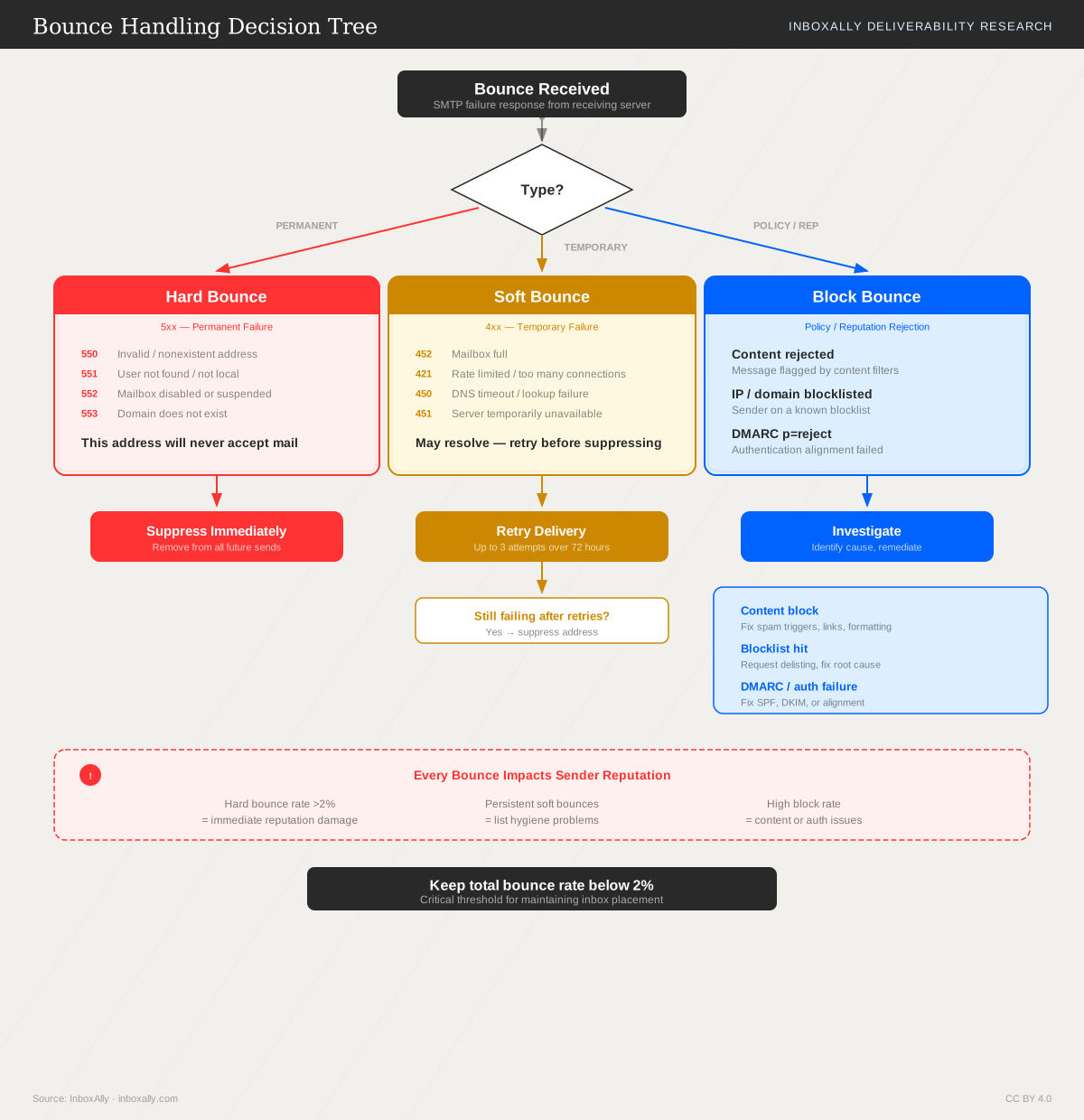
In email bounce management, “bounce” is the receiving mail system telling you why a message couldn’t be delivered. The most useful way to interpret bounces is by failure type (permanent, temporary, or policy/reputation), then confirm with the SMTP status code.
Hard bounce (permanent failure)
A hard bounce means the address (or destination) is not deliverable and will not succeed on retry.
Common examples
user@domain.comdoesn’t exist (typo, deleted mailbox)- Domain has no valid mail routing (bad MX)
- Recipient server rejects the address as invalid
Action: Suppress immediately. Also run InboxAlly’s Email List Verification before future sends to catch invalid addresses early and reduce email bounces.
Soft bounce (temporary failure)
A soft bounce indicates a transient condition where delivery may succeed later.
Common examples
- Mailbox is full
- Recipient server is temporarily unavailable or rate-limiting
- Message is too large (sometimes temporary, sometimes policy)
Action: Retry with backoff (typically 2–3 attempts across 24–72 hours). If it persists, suppress to protect your email bounce rate and sender reputation.
Block bounce (policy/reputation rejection)
A block bounce is a rejection based on policy, authentication, content, or reputation—not because the mailbox is invalid.
Common examples
- IP/domain reputation is poor
- Missing/failed SPF, DKIM, or DMARC alignment
- Content triggers filtering or the recipient requires TLS/auth
Action: Treat as urgent. Review authentication, complaint signals, and sending patterns. See Blocklist Impact and Remediation and Understanding Your IA Reputation Score. High bounces also undermine warm-up—clean lists first, then follow Email Ramp Up Schedule.
Common SMTP enhanced status codes (and what to do)
| Enhanced code | Typical meaning | Bounce type | Recommended action |
|---|---|---|---|
| 5.1.1 | Bad destination mailbox address | Hard | Suppress immediately; verify list source |
| 5.1.0 | Invalid address / recipient unknown | Hard | Suppress; run list verification |
| 5.2.2 | Mailbox full | Soft | Retry 2–3 times; suppress if persistent |
| 4.2.2 | Mailbox full / over quota (temporary) | Soft | Retry with backoff; monitor recurrence |
| 4.4.1 | Connection timed out / no response | Soft | Retry; check sending infrastructure |
| 5.7.1 | Delivery not authorized / blocked | Block | Investigate reputation/auth/content; remediate before scaling |
Why ESP “bounce categories” differ (and how to normalize)
Email platforms often label bounces differently because they:
- Parse different parts of the SMTP reply (enhanced code vs text)
- Map provider-specific messages into generic buckets
- Treat some
5.x.xcodes as “blocked” while others call them “hard”
Normalize with your own decision rules
- If
5.1.x→ Hard: suppress immediately. - If
4.x.x→ Soft: retry 2–3 times, then suppress. - If
5.7.x(or explicit “blocked”) → Block: pause scaling, fix reputation/auth, then resume.
What is an acceptable email bounce rate (and when it becomes a deliverability problem)?
For healthy email bounce management, most programs should target:
- Total bounce rate: < 2% (hard + soft combined)
- Hard bounce rate: < 0.5%
If you’re a high-volume sender (large daily/weekly sends), mailbox providers typically expect even tighter control because your reputation signals accumulate faster. In practice, treat 1% total as a “watch closely” line and 2% as “fix immediately.”
How to calculate bounce rate (correctly)
Use attempted deliveries as the denominator (not opens/clicks, and not “sent” after suppressions).
Formula:Bounce rate = (Total bounces ÷ Total delivery attempts) × 100
Also calculate:
- Hard bounce rate:
Hard bounces ÷ Attempts - Soft bounce rate:
Soft bounces ÷ Attempts
To find the real source of issues, segment bounce rates by:
- Mailbox provider (e.g., provider A vs provider B)
- Campaign/message type (newsletter vs promo vs transactional)
- List source (lead magnet, event upload, partner import, older segments)
Before ramping volume, run InboxAlly’s Email List Verification to remove invalid addresses—high bounces can undermine warm-up and reputation gains.
Red flags that require escalation
Investigate immediately when you see:
- Sudden spikes (e.g., 0.6% → 3% overnight): often list quality, authentication, or routing changes.
- Provider-specific bounces: one provider rejecting while others deliver suggests reputation or policy filtering.
- Rising hard-bounce share: indicates list decay, typos, or risky acquisition sources.
- Repeated soft bounces for the same addresses across multiple sends: suppress after 2–3 retries to prevent reputation drag.
If bounces coincide with blocks, review Blocklist Impact and Remediation and your Understanding Your IA Reputation Score.
How bounces damage sender reputation (and why ISPs penalize high-bounce senders)
Mailbox providers treat bounces—especially hard bounces (“unknown user,” “no such mailbox”)—as a high-confidence signal that your list acquisition and maintenance are weak. When bounce patterns suggest you’re sending to people who never asked for your email, ISPs protect their users by reducing your inbox access.
The signals ISPs infer from bounce patterns
High bounce rates don’t just indicate delivery failure; they imply risk:
- List acquisition quality: Large spikes in “unknown user” bounces often correlate with scraped, purchased, or poorly validated lists.
- User intent mismatch: If many recipients don’t exist (or were never real subscribers), ISPs assume low consent—an environment where spam complaints are more likely.
- “Unknown user” patterns at scale: Repeated invalid-recipient errors across multiple domains look like automated list generation or stale data.
- Trap correlation: The same behaviors that create bounces (typos, old lists, role accounts) also increase the odds of hitting typo and recycled spam traps—both strong negative reputation signals.
Downstream deliverability impacts
Once bounce-driven risk rises, providers may apply escalating penalties:
- Throttling and deferrals: Slower acceptance rates, more temporary failures, and longer queues.
- Increased spam placement: Even accepted mail is filtered more aggressively.
- Hard blocks (e.g., 5.7.1): Policy-based rejections tied to reputation and suspected abuse.
- Longer recovery time: Reputation rebuilds slowly; a few bad sends can outweigh weeks of “normal” performance.
For remediation workflows, see Blocklist Impact and Remediation and Understanding Your IA Reputation Score.
Why bounces undermine warm-up and ramp-up
Warm-up relies on consistent positive engagement signals. If your ramp-up includes high bounces, engagement can’t compensate because ISPs may limit delivery before users can open, read, or reply.
Best practice sequence:
- Clean first: Run InboxAlly’s Email List Verification to remove invalid and risky addresses.
- Then ramp: Follow a controlled Email Ramp Up Schedule so engagement signals build on a healthy list.
Root causes of bounces: diagnose what’s really happening to your list and infrastructure
High bounce rates don’t just waste sends—they signal poor list hygiene or infrastructure issues that can drag down reputation and undermine email bounce management. Start by separating list-quality problems from mailbox/provider problems, then validate with evidence.
List-quality causes (your data is the problem)
These typically show up as hard bounces and repeat across many domains:
- Stale lists: old subscribers, abandoned inboxes, recycled addresses.
- Purchased/rented lists: high invalid rates, spam traps, and role accounts; expect rapid reputation damage.
- Typo traps: misspellings like
gmial.comoryaho.comleading to “user unknown.” - Role-based addresses:
info@,support@,sales@often reject or filter aggressively. - Disposable/catch-all domains: temporary inbox providers or domains that accept-all but later reject; can look like soft bounces first.
- Bad signup sources: low-intent lead gen, unvalidated forms, incentivized signups, or missing double opt-in.
Use InboxAlly’s Email List Verification before sending—clean lists first, then warm up. High bounces can distort progress in Email Ramp Up Schedule plans.
Mailbox/provider causes (their side or your configuration)
These often appear as soft bounces or intermittent failures:
- Full mailboxes: recipient storage exceeded.
- Temporary server issues: provider downtime or throttling.
- Greylisting: “try again later” behavior for new/unknown senders.
- DNS/authentication misconfigurations: missing/incorrect SPF, DKIM, DMARC alignment.
- Routing problems: bad MX records, TLS negotiation failures, or upstream network issues.
If bounces coincide with blocks, review Blocklist Impact and Remediation and your Understanding Your IA Reputation Score.
Map causes to evidence (what to look at)
Use a structured triage:
- Bounce message + SMTP code (most reliable signal).
- Provider patterns (one domain vs. many).
- Time-based trends (new vs. old subscribers; sudden spike vs. gradual creep).
| Signal | Common SMTP code | Likely cause |
|---|---|---|
| “User unknown / no such user” | 550 / 5.1.1 | Invalid/stale/typo address |
| “Mailbox full” | 552 / 5.2.2 | Full recipient inbox (soft) |
| “Try again later / deferred” | 421 / 4.7.x | Greylisting/throttling |
| “Authentication required/failed” | 550 / 5.7.x | SPF/DKIM/DMARC or policy issue |
| “Host not found / no MX” | 550 / 5.1.2 | DNS/routing problem |
Bounce handling best practices: suppression rules that reduce email bounces without losing good subscribers
Strong email bounce management protects sender reputation and keeps your list usable. The goal is simple: suppress addresses that will never deliver, while giving temporary failures a short, controlled chance to recover.
Hard bounces: suppress immediately (permanent failures)
Hard bounces indicate a mailbox or domain that doesn’t exist. Continuing to send will inflate your email bounce rate and damage reputation.
Best practice rules
- Suppress/remove on first occurrence for permanent 5xx failures.
- Treat these as permanent:
- “Unknown user” / “user does not exist” (typically
550 5.1.1) - “Domain not found” / NXDOMAIN (often
550/553variants) - Keep an audit trail: store timestamp, SMTP code, bounce reason, campaign/message ID, and source list.
- Prevent re-imports: maintain a global suppression table and block uploads that contain suppressed addresses (or auto-suppress on import).
Soft bounces: retry briefly, then suppress (temporary failures)
Soft bounces are usually transient (mailbox full, temporary routing issues). But repeated soft bounces become a deliverability liability.
Retry strategy
- Retry 2–3 attempts across separate sends (not rapid-fire retries).
- If the address soft-bounces on all attempts, suppress (or move to a “needs reconfirmation” segment).
Differentiate transient vs persistent 4xx
| Pattern | Typical SMTP signal | Action |
|---|---|---|
| Transient issue (temporary) | 421/450/451 | Retry on next send (up to 2–3 total) |
| Persistent 4xx (repeated) | Same 4xx over multiple sends | Suppress after threshold; investigate list quality |
Block bounces: treat as a deliverability incident
Blocks (often policy/reputation-related) can spike quickly and affect your entire program.
Response playbook
- Pause or rate-limit sending to the affected domain/provider.
- Investigate reputation, authentication (SPF/DKIM/DMARC), content patterns, and complaint signals.
- Cross-reference: Blocklist Impact and Remediation and Understanding Your IA Reputation Score.
Prevention: reduce bounces before you send
- Use double opt-in to confirm ownership and reduce typos.
- Add typo correction at capture (common domains, missing “.com”, etc.).
- Run Email List Verification before campaigns to catch invalid/risky addresses.
- For warming: clean lists first, then warm up—high bounce rates undermine ramp-up. See Email Ramp Up Schedule.
List hygiene, spam traps, and ongoing monitoring: build a repeatable bounce management process
Build a list hygiene system (cadence + re-engagement + sunset policy)
A consistent hygiene routine is the fastest way to reduce email bounces and protect sender reputation.
Verification cadence
- Verify before any new import and before major sends (promotions, seasonal spikes).
- For ongoing programs, re-verify the full list every 30–60 days (more often if acquisition volume is high).
- Use Email List Verification to catch invalid, risky, and typo-prone addresses before they become hard bounces.
Re-engagement before purging
- Run a 2–3 email sequence to inactive subscribers (value reminder → preference update → “still want emails?”).
- If there’s no engagement, suppress rather than repeatedly retrying—continued sends to non-responders increases bounce risk over time.
Clear sunset policy
- Define inactivity by your cycle (example: no opens/clicks in 90–180 days).
- After the re-engagement window, move contacts to a sunset segment (no regular campaigns; optional quarterly check-in).
- Immediately suppress any address that hard bounces, and suppress repeated soft bounces per your retry rules.
Spam traps: what they are and how bounces connect
Spam traps are addresses used to identify poor list practices. Common types:
- Pristine traps: never opted in; usually come from scraping, purchased lists, or bad form practices.
- Recycled traps: old, abandoned addresses repurposed by providers—often hit when you keep mailing stale lists.
- Typo traps: misspellings (e.g., gmial.com) that slip through without verification.
Why bounce management matters: high bounce rates and weak acquisition controls correlate with trap hits (stale data, typos, and low-quality sources). Avoidance steps:
- Use double opt-in where possible.
- Verify at capture/import; block obvious typos and role accounts when appropriate.
- Remove hard bounces immediately; sunset inactives on schedule.
Audit + monitoring workflow (weekly, segmented, documented)
- Weekly dashboard checks
- Track total bounce rate, hard bounce rate, and trends by campaign.
- Segment by provider (Gmail, Yahoo, Microsoft) to spot localized delivery failure.
- Alert thresholds
- Investigate at >2% total bounces or >0.5% hard bounces; pause scaling if rising week-over-week.
- Document changes
- Log list sources, verification dates, suppression rules, and send volume changes.
- Use InboxAlly monitoring
- Review IA Reputation Score and Domain Reports for ongoing visibility; see Understanding Your IA Reputation Score and align volume changes with Email Ramp Up Schedule.
Need help diagnosing bounce issues? Open the IA Assistant in the InboxAlly app for guidance, or start a free trial to verify your list and monitor deliverability.